The art of color correction is an essential skill for photographers, designers, and beauty enthusiasts looking to perfect their craft. Whether it’s tweaking a photo in Photoshop or applying makeup to enhance natural beauty, understanding the basics of color correction can transform your work from average to professional quality. Our guide provides a color correction cheat sheet for beginners to help you get started.
When diving into the world of color correction, it’s crucial to have a foundation in color theory and the tools that bring your vision to life. This article will walk you through everything from using a color wheel for makeup correction to mastering Photoshop’s color adjustment tools, ensuring that your images and makeup applications look flawless.
What is a color correction cheat sheet for beginners?
Starting with color correction can be daunting, but a cheat sheet is a beginner’s best friend. A color correction cheat sheet serves as a quick reference guide, summarizing essential techniques and concepts to help you make informed color adjustments, whether on screen or skin.
For those starting in Photoshop, this cheat sheet includes understanding color models like RGB and CMYK, and how these colors mix to create a broad spectrum. It also highlights key Photoshop tools you’ll need, making it easier to start your color correction journey.
Makeup artists also benefit from cheat sheets that explain how different color correctors can neutralize skin imperfections. From covering dark circles to reducing redness, a cheat sheet quickly guides you through selecting the right shades for a flawless complexion.
How to use a color wheel for makeup correction?
The color wheel isn’t just for artists and designers; it’s a powerful tool for makeup artists as well. When applied to makeup correction, the color wheel helps in neutralizing skin imperfections by using complementary colors.
For instance, green concealers offset redness, while peach tones help conceal dark circles. Using the color wheel as a guide, you can easily determine which shades will correct and enhance skin tones.
Understanding the relationship between colors can drastically improve your makeup application techniques, resulting in a more balanced and natural look.
What are the essential Photoshop tools for color adjustment?
In Photoshop, color adjustment is made easy with a variety of built-in tools. The Levels and Curves tools allow for precise control over the tonal range and contrast of your images. With these, you can adjust highlights, midtones, and shadows independently.
The Hue/Saturation tool is excellent for tweaking colors without affecting their luminosity, while the Color Balance tool can quickly correct color casts and ensure your image’s colors are accurately represented.
These essential tools form the backbone of effective Photoshop color adjustment techniques and are crucial for anyone serious about mastering color correction in digital images.
How to correct skin tones using color correctors?
Correcting skin tones with makeup requires a careful selection of color correctors. Begin by identifying the skin issues you want to address – dark circles, redness, or sallowness. Then, apply the appropriate color corrector to neutralize the unwanted hue.
Here’s a simple guide:
- Peach for light to medium skin tones to hide dark circles
- Orange for medium to dark skin tones to mask bluish discolorations
- Green to counteract redness from acne or rosacea
By applying these correctors before your foundation or concealer, you can achieve a more even and natural-looking skin tone.
What are the common color correction techniques for flawless skin?
Flawless skin is often the result of expert color correction. Common techniques include using a makeup color corrector guide for beginners to choose the right concealer shades and layering products correctly for a smooth finish.
Another technique is the ‘dot and blend’ method, which involves applying small dots of corrector on problem areas and gently blending. This prevents over-application and maintains skin texture.
Remember to set your makeup with a translucent powder to ensure the correctors stay in place and maintain their effect throughout the day.
How to achieve professional-quality images with color correction?
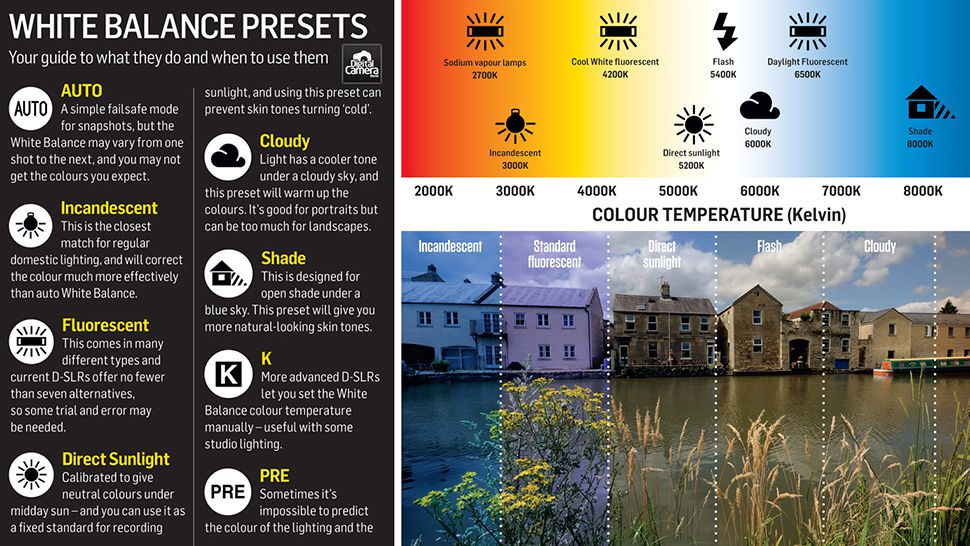
To achieve professional-quality images, color correction is key. It involves adjusting the white balance to ensure colors are true to life, enhancing image quality by correcting exposure, and refining the color palette to suit the mood or style of the image.
 Fruit nail art | Watermelon slice tutorial perfect for summer
Mastering these adjustments requires practice and an understanding of how colors interact. It’s important to have a calibrated monitor to ensure what you’re seeing is accurate.
Utilizing layers and adjustment masks in Photoshop can also help you make non-destructive edits, meaning you can experiment with different corrections without permanently altering your original image.
What are the best practices for color grading in Photoshop?
Color grading goes beyond correction; it’s the creative process of setting the tone and emotion of your image. Best practices include working in a controlled environment with consistent lighting and using a calibrated monitor.
Additionally, it’s essential to understand the impact of color theory on visual storytelling. For instance, warm tones can evoke feelings of happiness and energy, while cool tones might suggest calmness or sadness.
Utilizing Photoshop’s color grading tools, such as selective color adjustments and gradient maps, allows you to apply intricate color effects that can elevate your imagery.
Related Questions on Color Correction
What is a color correction cheat sheet?
A color correction cheat sheet is a reference guide that provides quick access to crucial color correction principles and techniques. It often includes tips on selecting the right tools and techniques for specific tasks, whether for photo editing or makeup application.
Cheat sheets can be particularly useful for beginners looking to familiarize themselves with the basics of color theory, Photoshop tools, and makeup color correctors, helping to streamline the learning process and improve outcomes.
How do I use a color corrector?
To use a color corrector effectively, start by identifying the problem areas on your skin that you want to address. Then, refer to the color wheel to choose a corrector shade that is opposite the color you want to neutralize.
Apply the corrector sparingly and blend well before applying foundation or concealer. For Photoshop, use adjustment layers to non-destructively apply color corrections and enhance your image’s overall look.
What are the best color correction techniques?
The best color correction techniques combine knowledge of color theory with practical application. In makeup, it involves using the correct shades to conceal imperfections and enhance natural skin tone.
In Photoshop, it entails using tools like Levels, Curves, and Selective Color to adjust and fine-tune the colors in your image. Consistent practice and a calibrated monitor are crucial for achieving the best results.
How can I improve my skin tone with makeup?
Improving skin tone with makeup starts with a clean, moisturized face. Use primers to create an even canvas and follow with color correctors to address specific skin concerns.
Choose a foundation that matches your skin tone and blend it well to avoid harsh lines. Highlighters and bronzers can add dimension and give a healthy glow, while a good setting powder ensures longevity.
What tools do I need for color correction in Photoshop?
For color correction in Photoshop, essential tools include the Levels, Curves, Hue/Saturation, and Color Balance tools. These are vital for making precise adjustments to tone and color.
Additionally, understanding the use of adjustment layers and masks can greatly enhance your ability to apply targeted corrections without affecting the entire image.
Enhancing your color correction skills, whether in Photoshop or with makeup, can greatly improve the quality of your images and applications. With these tips and techniques, you’re well-equipped to start practicing and achieving professional results.
To further illustrate these concepts, take a look at this YouTube video:
 Makeup brushes 101 | A detailed makeup brush guide for beginners